Plugin
Updated
Posts Table Pro
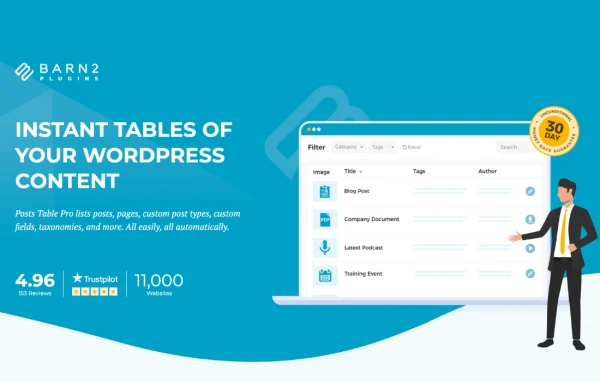
Posts Table Pro by Barn2 is a WordPress plugin that displays your content in searchable, sortable tables. It builds tables from posts, pages, products or any custom post type, so visitors can browse large collections without clicking through archive pages.
- Version
- 4.0.7
- Released
- Sep 24, 2026
- Developer
- Barn2 Media
- Type
- WordPress plugin
- Requires
- WooCommerce
- Licence
- GPL
- Included in
- Every plan, or $10.39 a year on its own
What’s new in Posts Table Pro 4.0.7
Version 4.0.7 · Sep 24, 2026
Latest
- ImprovedImproved handling of long filter names in the new tables, including tooltips for selected values.
- ImprovedUse the effective PHP memory limit for index batch checks.
- ImprovedDo not flush the persistent object cache during indexing.
- FixedClick-to-filter would not enable on the new table if it didn't have a visible associated filter, and would not always function correclty on the legacy tables.
- FixedDesign font sizes could disappear after saving the settings.
- FixedApply configured link and button font sizes in new tables while preserving defaults when unset.
- FixedFacetWP integration now reloads the new tables correctly after filtering and keeps the table's own filters disabled.
- FixedUpdated SearchWP integration to work with the new tables.
What it does
Standard WordPress archives work well for blogs, but they get awkward when you need to present a document library, a member directory or a collection of audio and video files. This plugin pulls your existing content into a table automatically, so there is no manual data entry. Visitors can search by keyword, sort columns and filter by category, tag, author or custom fields to find the entry they want.
You add a table with a shortcode or a Gutenberg block, and you can create as many tables as you need, each with its own content source and settings. There are more than 50 options and seven table templates, with control over colors, fonts, column headings and layout. Tables can include custom fields, taxonomies, images and embedded media, they load data with AJAX lazy loading, and they update on their own when you add or edit posts. The plugin lists WooCommerce as a requirement.
Best for
- Sites hosting document or file libraries
- Member, staff or business directories
- Audio, video and podcast archive sites
Features
Automatic table creation
Generate tables listing posts, pages, products or any custom post type straight from your existing content, with no need to enter data by hand.
Search, sort and filter
Visitors can run keyword searches, sort by column and use filters for category, tag, author or custom fields to narrow down long lists.
Custom fields and taxonomies
Show custom field values and taxonomy terms as table columns, giving each row the details that matter for your type of content.
Seven customizable templates
Start from one of seven table templates, then adjust colors, fonts, column headings and layout through more than 50 settings to fit your site design.
Embedded media in tables
Add audio players, video files, images and media playlists inside table rows, which suits podcast archives, video libraries and similar collections.
AJAX lazy loading
Tables holding hundreds or thousands of posts can load their data through AJAX lazy loading instead of rendering every row at once.
Mobile-friendly display options
Tables are responsive, with options for sticky headers and merged columns to keep information readable on phones and smaller screens.
Shortcode and block placement
Place a table anywhere with a shortcode or Gutenberg block, and build unlimited tables that refresh automatically when your content changes.
Posts Table Pro older versions
- 4.0.6Aug 311 improvement, 3 fixes
- 4.0.5Aug 141 improvement, 2 fixes, 1 change
- 4.0.4Jul 221 improvement, 1 fix, 1 change
- 4.0.3Jul 2
- 4.0.2Jun 20
- 4.0.0May 21
- 3.3.6Sep 5, 2025
- 3.3.5May 29, 2025
- 3.3.4May 14, 2025
- 3.3.3Apr 24, 2025
Members and buyers of this product can download older versions.
25 older versions in all. If you need one that is not listed, ask support.
Questions about Posts Table Pro
Can it display custom post types, or only regular posts?
It works with posts, pages, products and any custom post type. You can also show custom fields and taxonomies as columns, so content like events, documents or directory listings can appear in a table with their own details.
Do I have to update the tables when I publish new content?
No. The tables are generated from your existing WordPress content and update automatically when you add or modify posts, so your listings stay current without manual edits.
Will it handle a large number of posts?
The plugin is built to list hundreds or thousands of posts. It uses AJAX lazy loading so the table can bring in data as needed instead of loading every entry at once.
Can I match the tables to my site design?
Yes. You can choose from seven templates and adjust colors, fonts, column headings and layout, with more than 50 options available. Sticky headers and merged columns are also available for readability.
Is Posts Table Pro free?
The code of Posts Table Pro is licensed under the GPL, so anyone may use, change and share it. GPL Feast is a paid service: a plan or a single purchase gives you the download and automatic updates. The developer's own support, licence key and online services are not included.
Which version of Posts Table Pro is this?
Version 4.0.7, released Sep 24, 2026. New versions appear here when the developer publishes them, and members get them as automatic updates.
How do I update Posts Table Pro?
Install the free GPL Feast Updater on your site and connect it with your API key. It installs new versions of Posts Table Pro automatically and keeps a backup, so you can roll back.
What does Posts Table Pro need?
Posts Table Pro needs WooCommerce installed and active.
More from Barn2 Media