Plugin
Updated
WooCommerce Private Store
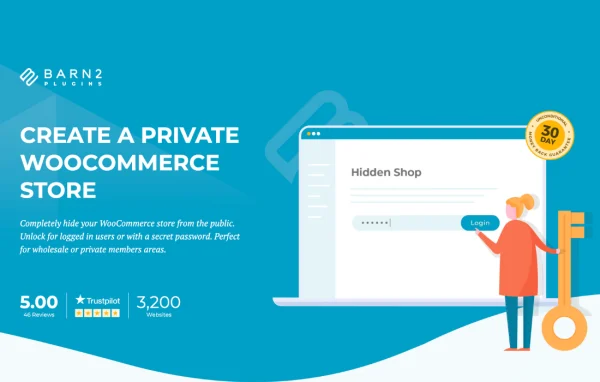
WooCommerce Private Store by Barn2 Media Ltd is a WordPress plugin that hides your WooCommerce shop from public view. Only logged-in users with approved roles or visitors with a password can see your products, categories, cart and checkout, while the rest of your site stays open to everyone.
- Version
- 1.8.5
- Released
- Oct 7, 2026
- Developer
- Barn2 Media
- Type
- WordPress plugin
- Requires
- WooCommerce
- Licence
- GPL
- Included in
- Every plan, or $10.39 a year on its own
What’s new in WooCommerce Private Store 1.8.5
Version 1.8.5 · Oct 7, 2026
Latest
- ImprovedUpdated internal libraries
- ImprovedTested up to WordPress 7.1.3 and WooCommerce 11.1.2
What it does
Some shops need to sell online without letting the whole internet see the catalog. Wholesalers, private clubs, showrooms and trade businesses often want customers to browse and order, but only after they have been approved. This plugin handles that by hiding every WooCommerce page, including products, categories, cart and checkout, from anyone who has not been given access. Your regular pages, such as the home page, blog or contact page, remain visible, so visitors still get a normal view of your brand.
Access works in two ways. You can set one or more passwords, which lets you give different groups their own password without creating separate accounts. You can also open the store to specific user roles, which suits tiered or VIP setups. Customers sign in on a secret login page using their account or a password. Hidden store pages are blocked from search engine indexing, and WooCommerce links are removed from menus and sidebar widgets. The plugin requires WooCommerce.
Best for
- Wholesale and trade businesses selling to approved buyers
- Members-only clubs and private shops
- Showrooms or private product launches on WooCommerce
Features
Hide the entire shop
Products, categories, cart and checkout pages are all kept out of public view, creating a store that only approved visitors can see.
Secret login page
Customers reach the store through a dedicated login page where they can sign in with a user account or enter a store password.
Multiple passwords
Assign several passwords to different customer groups, so each group gets its own access without needing a separate user account.
Access by user role
Open the store to chosen user roles only, which makes it possible to offer tiered access or a VIP experience for selected customers.
Main site stays public
Visitors can still browse your regular WordPress pages freely while the WooCommerce content stays hidden until they log in.
Blocked from search engines
Hidden store pages are automatically blocked from search engine indexing, so private products stay unlisted and out of search results.
Hidden menus and widgets
WooCommerce links in navigation menus and sidebar widgets are hidden too, so the private store does not leak through other parts of your site.
WooCommerce Private Store older versions
- 1.8.4Aug 261 new, 2 improvements
- 1.8.3Apr 102 improvements, 1 fix
- 1.8.2Jan 11 improvement, 1 fix
- 1.8.1Sep 18, 2025
- 1.8.0Jul 11, 2025
- 1.7.9Dec 26, 2024
- 1.7.8Sep 24, 2024
- 1.7.7Jul 9, 2024
- 1.7.6May 31, 2024
- 1.7.5May 3, 2024
Members and buyers of this product can download older versions.
12 older versions in all. If you need one that is not listed, ask support.
Questions about WooCommerce Private Store
Will visitors still be able to see the rest of my website?
Yes. Only the WooCommerce parts of your site are hidden, such as products, categories, cart and checkout. Your other WordPress pages stay public, so visitors can read about your business before they log in or enter a password.
Can I give different customer groups their own access?
Yes. You can create multiple passwords and hand a different one to each group, with no separate accounts needed. You can also allow access based on user roles, which is useful when you want tiered or VIP access for certain customers.
Will my private products show up in Google?
The plugin automatically blocks search engines from indexing the hidden store pages. Store links are also removed from menus and sidebar widgets, so your private products stay unlisted for anyone without access.
Do I need WooCommerce to use it?
Yes. The plugin works on top of WooCommerce and controls who can see your WooCommerce shop pages, so WooCommerce needs to be running on your WordPress site.
Is WooCommerce Private Store free?
The code of WooCommerce Private Store is licensed under the GPL, so anyone may use, change and share it. GPL Feast is a paid service: a plan or a single purchase gives you the download and automatic updates. The developer's own support, licence key and online services are not included.
Which version of WooCommerce Private Store is this?
Version 1.8.5, released Oct 7, 2026. New versions appear here when the developer publishes them, and members get them as automatic updates.
How do I update WooCommerce Private Store?
Install the free GPL Feast Updater on your site and connect it with your API key. It installs new versions of WooCommerce Private Store automatically and keeps a backup, so you can roll back.
What does WooCommerce Private Store need?
WooCommerce Private Store needs WooCommerce installed and active.
More from Barn2 Media