Plugin
Updated
WooCommerce Bulk Variations
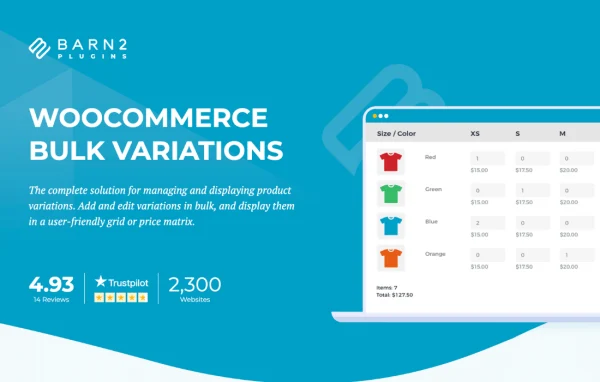
WooCommerce Bulk Variations by Barn2 Media is a WooCommerce plugin that changes how product variations are shown and managed. It swaps the default dropdowns for a grid or price matrix, so customers can enter quantities for several variations and add them to the cart together.
- Version
- 2.5.3
- Released
- Oct 6, 2026
- Developer
- Barn2 Media
- Type
- WordPress plugin
- Requires
- WooCommerce
- Licence
- GPL
- Included in
- Every plan, or $10.39 a year on its own
What’s new in WooCommerce Bulk Variations 2.5.3
Version 2.5.3 · Oct 6, 2026
Latest
- ImprovedImproved performance of the variations grid for products with a large number of variations.
- ChangedUpdated internal libraries.
- ChangedTested up to WooCommerce 11.1.2.
What it does
Standard WooCommerce variation dropdowns make shoppers pick one combination at a time. That gets slow when a product comes in many sizes and colors, or when a buyer wants a mix of options in quantity. This plugin lays all the attributes out in a table instead, with prices, stock status and variation descriptions visible together. Customers type quantities into the boxes they need and add everything to the cart in one step, which suits clothing stores, wholesale shops and B2B buyers.
On the admin side, you can filter variations on the Edit Product screen and apply bulk changes to the ones you select, such as prices, images and stock status. You choose between Order Form mode with quantity inputs or Price Matrix mode for a price-only view. The grid can be turned on for the whole store, for specific products, or placed anywhere with a shortcode. It requires WooCommerce, works with any WooCommerce theme and adapts to different screen sizes.
Best for
- Clothing stores selling items in many sizes and colors
- Wholesale and B2B shops taking large-volume orders
- WooCommerce stores with products that have many variations
Features
Variation grid with quantity boxes
Replaces the default variation dropdowns with an organized table where customers enter quantities for multiple variations and add them to the cart together.
Two display modes
Pick Order Form mode with quantity inputs for bulk ordering, or Price Matrix mode when you only want to show prices for each combination.
Bulk variation editing
Add, edit and update many product variations at the same time instead of opening and changing each variation one by one.
Filtering and bulk actions
Filter variations on the Edit Product screen, then apply changes to the selected ones, including prices, images and stock status.
Flexible grid placement
Turn the variations grid on globally, enable it only for specific products, or insert it anywhere on your site using a shortcode.
Customizable rows and columns
Set up the grid's rows and columns and choose whether to display product images, prices, stock availability and variation descriptions.
Responsive theme compatibility
Works with any WooCommerce theme and adjusts its layout for desktops, tablets and mobile devices.
Works with other Barn2 plugins
Can be used alongside WooCommerce Quick View Pro and Default Quantity from the same developer.
WooCommerce Bulk Variations older versions
- 2.5.2Sep 81 new, 1 change
- 2.5.1Jul 82 improvements
- 2.5.0Jun 22 new, 1 improvement
- 2.4.8Mar 25
- 2.4.7Dec 30, 2025
- 2.4.6Sep 20, 2025
- 2.4.5Jul 11, 2025
- 2.4.4Dec 4, 2024
- 2.4.3Nov 14, 2024
- 2.4.2Oct 23, 2024
Members and buyers of this product can download older versions.
17 older versions in all. If you need one that is not listed, ask support.
Questions about WooCommerce Bulk Variations
Can customers add several variations to the cart at once?
Yes. In Order Form mode the grid shows a quantity box for each variation, so a shopper can fill in amounts for several sizes or colors and add them all to the cart in a single action.
Do I have to use the grid on every product?
No. You can enable the variations grid across the whole store, switch it on only for specific products, or place it on any page with a shortcode, depending on how much control you want.
What information can the grid display?
The grid can show product attributes, prices, stock status and variation descriptions, and you can also include product images. Rows and columns can be customized, and Price Matrix mode gives a price-only view.
Will it work with my theme and on mobile?
The plugin requires WooCommerce and is described as compatible with any WooCommerce theme. The grid is responsive, so it adapts to desktop, tablet and mobile screen sizes.
Is WooCommerce Bulk Variations free?
The code of WooCommerce Bulk Variations is licensed under the GPL, so anyone may use, change and share it. GPL Feast is a paid service: a plan or a single purchase gives you the download and automatic updates. The developer's own support, licence key and online services are not included.
Which version of WooCommerce Bulk Variations is this?
Version 2.5.3, released Oct 6, 2026. New versions appear here when the developer publishes them, and members get them as automatic updates.
How do I update WooCommerce Bulk Variations?
Install the free GPL Feast Updater on your site and connect it with your API key. It installs new versions of WooCommerce Bulk Variations automatically and keeps a backup, so you can roll back.
What does WooCommerce Bulk Variations need?
WooCommerce Bulk Variations needs WooCommerce installed and active.
More from Barn2 Media