Plugin
Updated
Wishlists for WooCommerce
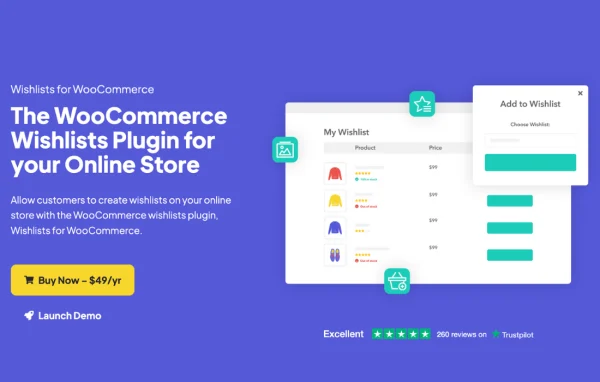
Wishlists for WooCommerce by Iconic is a plugin that adds wishlist features to a WooCommerce store. Shoppers can save products for later, organize them into separate lists for different occasions and share those lists with friends and family.
- Version
- 1.8.1
- Released
- Apr 28, 2025
- Developer
- IconicWP
- Type
- WordPress plugin
- Requires
- WooCommerce
- Licence
- GPL
- Included in
- Every plan, or $5.59 a year on its own
What’s new in Wishlists for WooCommerce 1.8.1
Version 1.8.1 · Apr 28, 2025
Latest
- ImprovedUpdated dependencies and added more safety checks to telemetry opt-ins/opt-outs
What it does
Many shoppers browse a store without being ready to buy. They might be planning a birthday, building a holiday gift list or simply saving items for another day. This plugin gives them a place to keep those products. It places add to wishlist buttons on product pages and shop pages, and customers can create as many wishlists as they like, each set to public or private. Shared lists can go out by social media, email or a direct link, and public lists can be found through a search by name, email or wishlist title.
On the customer side, wishlists live in a dashboard with a clean table layout where items can be viewed, edited and managed. Adding or updating a list happens in a popup overlay, so shoppers stay on the page they were browsing. Every WooCommerce product type is supported, including variations. Store owners can view and manage all customer wishlists from the backend, adjust button styling and position, and place buttons with a shortcode. The plugin requires WooCommerce and uses a responsive design.
Best for
- WooCommerce stores that sell giftable products
- Shops with busy holiday and special occasion seasons
- Store owners who want to see customer wishlists
Features
Wishlist buttons on store pages
Add to wishlist buttons appear on product pages and shop pages, so customers can save an item the moment they find it.
Unlimited wishlists per customer
Shoppers can create as many wishlists as they need, for example one for birthdays, one for Christmas and one for personal use.
Sharing by social, email or link
Customers can share any wishlist across social media, send it by email or pass along a direct link to friends and family.
Public and private lists
Each wishlist can be set as public or private, giving customers control over who is able to see the products they have saved.
Wishlist search
Visitors can look up public wishlists by a person's name, email address or wishlist title, which helps when shopping for a gift.
Popup add and update actions
Adding products to a list or updating a list happens in a popup overlay, keeping the shopper on the current page.
Support for all product types
Every WooCommerce product type works with wishlists, including variable products, so customers can save the exact variation they want.
Custom button styling and shortcode
Store owners can change how wishlist buttons look and where they sit, or insert them anywhere with a shortcode.
Wishlists for WooCommerce older versions
- 1.8.0Feb 27, 20251 improvement
- 1.7.0Nov 20, 20241 fix
- 1.6.0Apr 13, 20243 improvements
- 1.5.3Dec 15, 2023
- 1.5.2Dec 6, 2023
- 1.5.1Sep 4, 2023
- 1.5.0Aug 29, 2023
- 1.4.6Jul 26, 2023
- 1.4.4Jun 11, 2023
- 1.4.3Apr 18, 2023
Members and buyers of this product can download older versions.
Questions about Wishlists for WooCommerce
Can customers keep more than one wishlist?
Yes. Customers can create unlimited wishlists and name them for different purposes, such as a birthday list, a Christmas list or a personal list of items to buy later. Each one is managed from a dashboard with a table layout.
Can a shopper keep a wishlist private?
Yes. Every wishlist can be set as public or private. Public lists can be shared and found through the wishlist search, which looks up lists by name, email or wishlist title, while private lists stay visible only to the customer.
Does it work with variable products?
It supports all WooCommerce product types, including variations. Customers can save the specific option they want, such as a particular size or color, to their wishlist.
Can I control where the wishlist button appears?
Yes. You can customize the button styling and position through the plugin settings, and you can also insert the button with a shortcode wherever it fits your layout.
Is Wishlists for WooCommerce free?
The code of Wishlists for WooCommerce is licensed under the GPL, so anyone may use, change and share it. GPL Feast is a paid service: a plan or a single purchase gives you the download and automatic updates. The developer's own support, licence key and online services are not included.
Which version of Wishlists for WooCommerce is this?
Version 1.8.1, released Apr 28, 2025. New versions appear here when the developer publishes them, and members get them as automatic updates.
How do I update Wishlists for WooCommerce?
Install the free GPL Feast Updater on your site and connect it with your API key. It installs new versions of Wishlists for WooCommerce automatically and keeps a backup, so you can roll back.
What does Wishlists for WooCommerce need?
Wishlists for WooCommerce needs WooCommerce installed and active.
More from IconicWP