Plugin
Updated
WooCommerce QuickTray
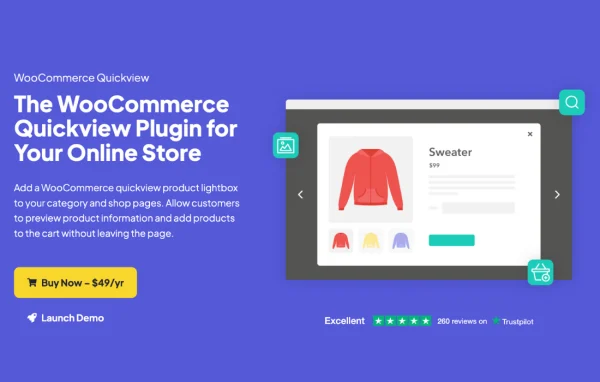
WooCommerce QuickTray is a WooCommerce plugin by Iconic that adds a quickview lightbox to your shop and category pages. Shoppers can open a popup with product details, check the gallery and price, and add the item to their cart without leaving the page they are browsing.
- Version
- 1.0.6
- Released
- Nov 10, 2021
- Developer
- IconicWP
- Type
- WordPress plugin
- Requires
- WooCommerce
- Licence
- GPL
- Included in
- Every plan, or $4.79 a year on its own
What’s new in WooCommerce QuickTray 1.0.6
Version 1.0.6 · Nov 10, 2021
Latest
- FixedRare issue where the tray would overlap with products
What it does
On a typical WooCommerce store, checking a product means clicking through to its page and then heading back to the catalog. This plugin adds a quickview button to your product listings that opens a lightbox with the product's gallery, title, price, ratings and meta information. Customers can add the item to their cart from inside that popup and move to the next or previous product without closing it, which keeps browsing in one place.
You decide how it looks and what it shows. The button's text, color, style, padding, icon, position and visibility are all adjustable, and you can choose a full, short or no description inside the lightbox. It works with simple, variable and digital products, uses WooCommerce hooks to fit in with well-coded themes and page builders, and includes a shortcode for placing quickview buttons on any page or post. It requires WooCommerce.
Best for
- WooCommerce stores with large product catalogs
- Shops selling variable or digital products
- Developers building custom WooCommerce storefronts
Features
Quickview lightbox
Opens a popup window on shop and category pages so customers can preview a product and add it to their cart without leaving the listing.
Customizable quickview button
Adjust the button text, color, style, padding, icon, position and visibility so it matches the look of your store theme.
Choose lightbox contents
Pick which details appear, including gallery, title, price, ratings and meta information, and show a full, short or no description.
Next and previous navigation
Shoppers can move between products directly inside the lightbox, browsing the catalog one item after another without closing the popup.
Support for all product types
Works with simple, variable and digital WooCommerce products, so the quickview behaves consistently across your whole catalog.
Shortcode placement
Insert quickview buttons anywhere on your site with a shortcode, letting visitors preview and add products from any page or post.
Mobile responsive layout
The lightbox is built to display and work on smartphones, tablets and desktop screens alike.
Hooks for developers
Action and filter hooks let developers customize behavior and add extra product information to the lightbox.
Questions about WooCommerce QuickTray
Will the quickview work with variable products?
Yes. The plugin supports simple, variable and digital WooCommerce products, so customers can preview and add any of these types to their cart from the lightbox.
Can I control what shows up inside the popup?
You can. Choose whether the lightbox shows the gallery, title, price, ratings and meta information, and pick a full description, a short description or none at all to suit your store.
Does it work with my theme or page builder?
It uses standard WooCommerce hooks, which helps it fit in with well-coded WordPress themes, page builders and templates. The styling is clean and minimal so it blends into most store designs.
Can I add quickview buttons outside the shop pages?
Yes. A shortcode lets you place quickview buttons on any page or post, so visitors can preview products and add them to the cart from blog posts, landing pages and other content.
Is WooCommerce QuickTray free?
The code of WooCommerce QuickTray is licensed under the GPL, so anyone may use, change and share it. GPL Feast is a paid service: a plan or a single purchase gives you the download and automatic updates. The developer's own support, licence key and online services are not included.
Which version of WooCommerce QuickTray is this?
Version 1.0.6, released Nov 10, 2021. New versions appear here when the developer publishes them, and members get them as automatic updates.
How do I update WooCommerce QuickTray?
Install the free GPL Feast Updater on your site and connect it with your API key. It installs new versions of WooCommerce QuickTray automatically and keeps a backup, so you can roll back.
What does WooCommerce QuickTray need?
WooCommerce QuickTray needs WooCommerce installed and active.
More from IconicWP