Plugin
Updated
Multiple Email Recipients
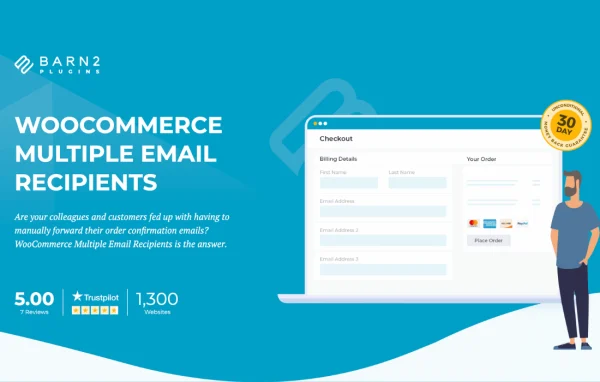
WooCommerce Multiple Email Recipients by Barn2 Media Ltd is a WordPress plugin that sends WooCommerce notifications to more than one email address. It lets you add extra recipients per customer and route order emails for specific products or categories to suppliers, warehouses or fulfillment centers.
- Version
- 1.2.15
- Released
- Jul 27, 2026
- Developer
- Barn2 Media
- Type
- WordPress plugin
- Requires
- WooCommerce
- Licence
- GPL
- Included in
- Every plan, or $10.39 a year on its own
What’s new in Multiple Email Recipients 1.2.15
Version 1.2.15 · Jul 27, 2026
Latest
- FixedAdditional recipients not being sent when manually resending order notifications from admin
- ImprovedUpdated internal libraries and tested up to WordPress 7.0 and WooCommerce 10.9
- ImprovedEnhanced security and data handling in admin scripts and settings
What it does
Many stores have more than one person or business who needs to see an order. A customer may want a colleague copied on their receipts, or a supplier may need to know the moment an item sells. Without help, someone ends up forwarding emails by hand, which takes time and invites mistakes. This plugin removes that step by sending WooCommerce emails directly to the extra addresses you set, so the right people get order details without anyone passing them along. It requires WooCommerce.
There are two main ways to use it. First, you can attach unlimited additional email addresses to each customer, and customers can manage those addresses themselves on their Account page, at checkout, or both. Second, you can route notifications for chosen products or categories to designated suppliers, stores or fulfillment centers. You also decide which WooCommerce emails go to the extra recipients, including emails from other plugins such as WooCommerce Subscriptions. That makes it a good fit for dropshipping and multi-supplier setups.
Best for
- WooCommerce stores that work with dropshippers or multiple suppliers
- B2B shops where several staff need copies of orders
- Stores using fulfillment centers or separate warehouses
Features
Unlimited extra recipients
Add as many additional email addresses as needed to each WooCommerce customer so everyone involved with their orders receives the same notifications.
Product and category routing
Send notifications for specific products or categories to designated suppliers, stores or fulfillment centers, so each partner only sees the orders that concern them.
Choose which emails go out
Pick exactly which WooCommerce emails reach additional recipients, including emails generated by other plugins such as WooCommerce Subscriptions.
Customer-managed addresses
Let customers add and manage their own extra email addresses on their Account page, during checkout, or in both places, depending on how you configure it.
Supplier and dropshipper alerts
Automatically email warehouses, suppliers or drop shippers when relevant orders come in, so fulfillment partners can act without waiting for a forwarded message.
Works with admin resends
Additional recipients are included when you manually resend order notifications from the WordPress admin, keeping everyone copied on corrected or repeated emails.
Quick setup
Configuration is handled through a straightforward settings interface, and the developer describes getting started as taking about five minutes.
Multiple Email Recipients older versions
- 1.2.14Sep 10, 20251 new, 2 improvements
- 1.2.13May 6, 20252 improvements
- 1.2.12Dec 14, 20242 improvements, 2 fixes
- 1.2.10Nov 10, 2023
- 1.2.9Sep 7, 2023
- 1.2.8May 25, 2023
- 1.2.7Apr 18, 2023
Members and buyers of this product can download older versions.
Questions about Multiple Email Recipients
Can I send orders for certain products to a specific supplier?
Yes. You can route notifications based on specific products or product categories, so orders containing those items are emailed automatically to the supplier, store or fulfillment center you designate.
Can my customers add extra email addresses themselves?
Yes. You can let customers manage additional email addresses on their Account page, during checkout, or both. There is no limit on how many extra addresses each customer can have.
Does it work with emails from other WooCommerce extensions?
It does. You choose which WooCommerce emails are sent to additional recipients, and that includes emails from other plugins such as WooCommerce Subscriptions. The plugin requires WooCommerce to be active on your site.
Will extra recipients get emails I resend manually from the admin?
Yes. When you manually resend an order notification from the WordPress admin, the additional recipients are included along with the main customer address.
Is Multiple Email Recipients free?
The code of Multiple Email Recipients is licensed under the GPL, so anyone may use, change and share it. GPL Feast is a paid service: a plan or a single purchase gives you the download and automatic updates. The developer's own support, licence key and online services are not included.
Which version of Multiple Email Recipients is this?
Version 1.2.15, released Jul 27, 2026. New versions appear here when the developer publishes them, and members get them as automatic updates.
How do I update Multiple Email Recipients?
Install the free GPL Feast Updater on your site and connect it with your API key. It installs new versions of Multiple Email Recipients automatically and keeps a backup, so you can roll back.
What does Multiple Email Recipients need?
Multiple Email Recipients needs WooCommerce installed and active.
More from Barn2 Media