Plugin
Updated
Quick View Pro
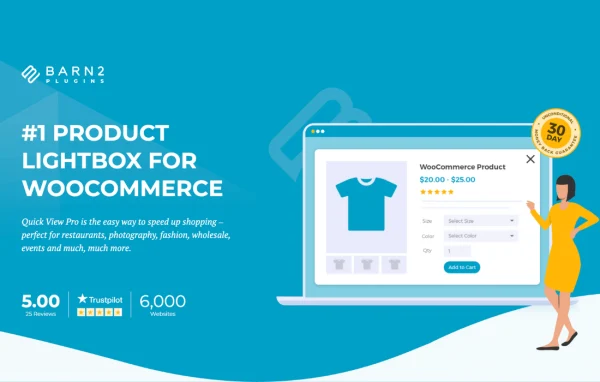
WooCommerce Quick View Pro by Barn2 Media Ltd is a WooCommerce plugin that opens product details in a lightbox popup. Shoppers can see images, variations and descriptions, then add items to the cart without leaving the product listings page.
- Version
- 1.7.17
- Released
- Jul 28, 2026
- Developer
- Barn2 Media
- Type
- WordPress plugin
- Requires
- WooCommerce
- Licence
- GPL
- Included in
- Every plan, or $10.39 a year on its own
What’s new in Quick View Pro 1.7.17
Version 1.7.17 · Jul 28, 2026
Latest
- NewAdded the Help Scout beacon in the plugin settings
- ImprovedUpdated the internal libraries and tested up to WordPress 7.0 and WooCommerce 10.9
What it does
In a typical WooCommerce store, checking a product means clicking through to its page and then clicking back to the shop to keep browsing. This plugin removes that back and forth. A quick view link, button or hover trigger opens a popup with the product's images, description and options, and customers can add the item to their cart from there using AJAX, with no page reload. After adding, they can keep browsing or go straight to checkout.
The plugin works with simple, variable, external or affiliate, virtual, downloadable and grouped products, so it fits most catalogs. You decide how much product information appears, whether images and galleries show, and what the quick view button says. Shortcodes let you place the trigger anywhere on your site. It also works alongside WooCommerce Product Table, WooCommerce Product Add-Ons, and multilingual plugins such as WPML, TranslatePress and Weglot. Settings are handled through a plain interface with no coding needed.
Best for
- WooCommerce stores with large or varied product catalogs
- Shops selling variable products or items with add-on options
- Multilingual WooCommerce stores using WPML, TranslatePress or Weglot
Features
Lightbox with add to cart
Customers open a product in a popup and add it to the cart through AJAX, staying on the listings page without a page reload.
Support for all product types
Works with simple, variable, external or affiliate, virtual, downloadable and grouped products, so different catalog setups can all use the quick view.
Control over displayed content
Show full or partial product information, switch images and galleries on or off, and change the quick view button text to suit your store.
Product gallery with zoom
A responsive gallery inside the popup displays multiple product images, and shoppers can zoom in for a closer look at details.
Product add-ons in the popup
Supports WooCommerce Product Add-Ons, so customers can pick extra options or add-ons directly inside the quick view window before adding to cart.
Flexible trigger options
Display quick view as a clickable link, a button or a hover effect, and use shortcodes to place it anywhere on your site.
Works with Product Table
Runs alongside the WooCommerce Product Table plugin, letting shoppers open quick views from product tables for faster browsing and ordering.
Multilingual compatibility
Compatible with WPML, TranslatePress and Weglot, so the quick view popup can be offered to customers in multiple languages.
Quick View Pro older versions
- 1.7.16Mar 152 improvements, 1 fix
- 1.7.15Sep 11, 20251 new, 2 improvements, 1 fix
- 1.7.14Jul 3, 20253 improvements
- 1.7.13Mar 1, 2025
- 1.7.12Dec 5, 2024
- 1.7.11Oct 24, 2024
- 1.7.9Jun 27, 2024
- 1.7.8Feb 23, 2024
- 1.7.7Nov 10, 2023
- 1.7.4Sep 14, 2023
Members and buyers of this product can download older versions.
12 older versions in all. If you need one that is not listed, ask support.
Questions about Quick View Pro
Can customers choose variations and add to cart from the popup?
Yes. The quick view lightbox shows product variations along with images and descriptions, and customers can add the product to their cart through AJAX without the page reloading. They can then keep browsing or go directly to checkout.
Does it work with grouped and external products?
It does. The plugin supports simple, variable, external or affiliate, virtual, downloadable and grouped products, so you can use quick view across a mixed catalog.
Can I change how the quick view button looks and where it appears?
You can show the trigger as a link, a button or a hover effect and edit the button text. Shortcodes let you place quick view anywhere on your site, and you can choose which product details and images the popup includes.
Will it work with product add-ons and translation plugins?
Yes. It supports WooCommerce Product Add-Ons inside the popup, works with WooCommerce Product Table, and is compatible with WPML, TranslatePress and Weglot for multilingual stores. WooCommerce itself is required.
Is Quick View Pro free?
The code of Quick View Pro is licensed under the GPL, so anyone may use, change and share it. GPL Feast is a paid service: a plan or a single purchase gives you the download and automatic updates. The developer's own support, licence key and online services are not included.
Which version of Quick View Pro is this?
Version 1.7.17, released Jul 28, 2026. New versions appear here when the developer publishes them, and members get them as automatic updates.
How do I update Quick View Pro?
Install the free GPL Feast Updater on your site and connect it with your API key. It installs new versions of Quick View Pro automatically and keeps a backup, so you can roll back.
What does Quick View Pro need?
Quick View Pro needs WooCommerce installed and active.
More from Barn2 Media