Plugin
Updated
Restaurant Ordering
WooCommerce Restaurant Ordering by Barn2 Media Ltd is a WordPress plugin that turns a WooCommerce store into an online ordering system for a restaurant. Customers browse your menu, choose options and pay online from a phone or computer, while orders flow through WooCommerce.
- Version
- 2.1.12
- Released
- Feb 3, 2026
- Developer
- Barn2 Media
- Type
- WordPress plugin
- Requires
- WooCommerce
- Licence
- GPL
- Included in
- Every plan, or $10.39 a year on its own
What’s new in Restaurant Ordering 2.1.12
Version 2.1.12 · Feb 3, 2026
Latest
- FixedWP Bakery page builder content was not rendered in the product modal
- ImprovedUpdated internal libraries and tested up to WordPress 6.9 and WooCommerce 10.4.3
What it does
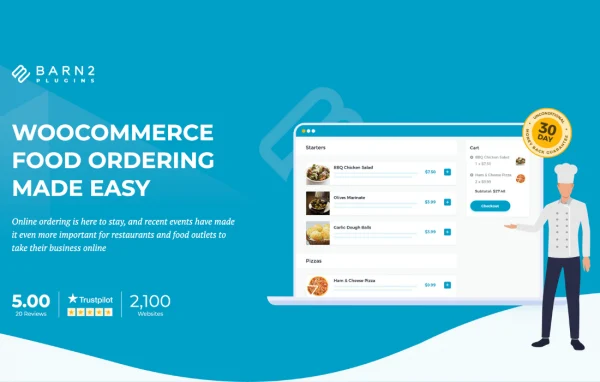
Restaurants that want to take orders online often end up with a regular shop layout that feels clumsy for food. This plugin gives you a menu-style ordering page modeled on the layout of popular food delivery apps. You pick a single list, two columns or three columns, decide which food details to display, and let customers add dishes to their cart quickly, either with one click or through a lightbox where they choose quantities and options first.
Because it runs on WooCommerce, which it requires, your orders, payments and reports stay in the system you already use. Dishes can be WooCommerce variable products, so sizes or flavors work as expected. You can set opening times so ordering switches off when you are closed, and show custom open or closed messages. For extra toppings, sizes and dietary preferences, it works with Barn2's Product Options plugin.
Best for
- Restaurants taking takeout or delivery orders online
- Cafes and food outlets already running WooCommerce
- Freelancers building ordering sites for local eateries
Features
Menu layouts in columns
Display your menu as a single list or in two or three columns, and choose which food details appear for each item.
Opening times control
Set your opening hours so online ordering is automatically disabled while the restaurant is closed.
Open and closed messages
Show custom messages that tell customers whether ordering is currently available, so they know when they can place an order.
Quick order or lightbox
Choose one-click ordering for speed, or a customizable lightbox where customers pick quantities and options before adding a dish to the cart.
Variable product support
Works with WooCommerce variable products, so a dish can be offered in several variations such as different sizes or flavors.
Food options and add-ons
Pair it with Barn2's Product Options plugin to offer extra toppings, sizes, quantities and dietary preference choices on menu items.
Responsive ordering pages
The menu layout adapts to desktop, tablet and smartphone screens, so customers can order from whatever device they have.
WooCommerce order handling
Orders, payment processing and reporting are handled by WooCommerce, keeping restaurant sales in the same place as the rest of your store data.
Restaurant Ordering older versions
- 2.1.11Sep 11, 20251 new, 1 improvement
- 2.1.10Apr 24, 20252 improvements
- 2.1.9Nov 26, 20241 new, 2 improvements
- 2.1.8Jun 19, 2024
- 2.1.7Feb 8, 2024
- 2.1.6Nov 10, 2023
- 2.1.4Sep 7, 2023
- 2.1.3Aug 14, 2023
- 2.1.2Apr 18, 2023
Members and buyers of this product can download older versions.
Questions about Restaurant Ordering
Do I need WooCommerce to use this plugin?
Yes. The plugin requires WooCommerce and builds on it. Your menu items are WooCommerce products, and WooCommerce takes care of the cart, payment processing, order management and reporting.
Can customers add toppings or choose sizes?
Sizes and flavors can be set up as WooCommerce variable products. For extra toppings, quantities and dietary preferences, the plugin works with Barn2's Product Options plugin, which adds those choices to your menu items.
What happens when my restaurant is closed?
You set your opening times, and ordering is automatically disabled outside those hours. You can also write custom messages that let customers know whether ordering is open or closed at the moment.
How does the menu look to customers?
The menu uses an ordering layout inspired by food delivery apps. You can show it as a single list or in two or three columns, pick which food details appear, and it adjusts to phones, tablets and desktops.
Is Restaurant Ordering free?
The code of Restaurant Ordering is licensed under the GPL, so anyone may use, change and share it. GPL Feast is a paid service: a plan or a single purchase gives you the download and automatic updates. The developer's own support, licence key and online services are not included.
Which version of Restaurant Ordering is this?
Version 2.1.12, released Feb 3, 2026. New versions appear here when the developer publishes them, and members get them as automatic updates.
How do I update Restaurant Ordering?
Install the free GPL Feast Updater on your site and connect it with your API key. It installs new versions of Restaurant Ordering automatically and keeps a backup, so you can roll back.
What does Restaurant Ordering need?
Restaurant Ordering needs WooCommerce installed and active.
More from Barn2 Media