Plugin
Updated
Thrive Apprentice
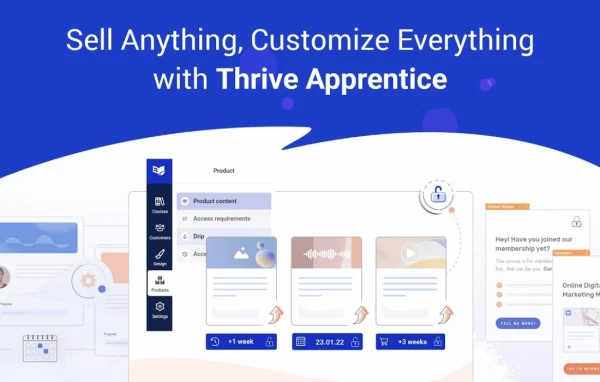
Thrive Apprentice by Thrive Themes is a WordPress learning management plugin for creating and running online courses on your own site. It helps you organize lessons and modules, schedule when students can reach each part, and present everything in a clean layout that matches your site's design.
Install this firstPlease install the Thrive Product Manager Plugin from here to Activate Thrive Products
Go to product- Version
- 11.1
- Released
- Oct 8, 2026
- Developer
- Thrive Themes
- Type
- WordPress plugin
- Licence
- GPL
- Included in
- Every plan, or $7.19 a year on its own
What’s new in Thrive Apprentice 11.1
Version 11.1 · Oct 8, 2026
Latest
What it does
Many course creators want to teach from their own WordPress site without moving to a separate platform or wrestling with a heavy LMS. This plugin keeps the course inside your existing website. You build courses from lessons and modules using a drag and drop builder, and the course pages pick up your site's style, so the learning area looks like part of your brand without extra coding.
Once a course is built, you decide how students move through it. Drip scheduling lets you release materials over time instead of all at once, and access control limits content to enrolled students or subscribers, with compatibility for membership plugins. You can adjust fonts, colors and layouts, attach PDFs and other resources to lessons, and keep an eye on student progress and access patterns as people work through the material.
Best for
- Course creators selling lessons on their own WordPress site
- Educators and coaches running paced, drip-fed programs
- Businesses offering branded training to members or customers
Features
Drag and drop course builder
Create and arrange lessons, modules and full courses in a drag and drop interface, so you can shape the course structure without writing code.
Drip content scheduling
Choose how and when students can access each part of a course, releasing materials gradually so learners move through the content at the pace you set.
Matches your site's style
Course pages inherit the styling of your existing WordPress site, giving lessons a consistent, branded look without additional coding.
Distraction-free lesson layouts
Lessons are presented in clean, student-friendly layouts focused on readability and easy navigation between lessons and modules.
Custom fonts, colors and layouts
Adjust fonts, colors and layouts to fit your brand identity and give your learning area its own look.
Access control for enrolled students
Restrict course content so only enrolled students or subscribers can view it, with compatibility for membership plugins.
Student progress tracking
Monitor student progress and access patterns on drip-fed content to see how learners move through your course and where to adjust it.
Downloadable lesson resources
Attach PDFs, worksheets or bonus materials directly inside lessons so students can grab supporting files while they learn.
Thrive Apprentice older versions
- 11.0.1Sep 23
- 11.0.0.1Sep 16
- 11.0Sep 9
- 10.9.3.3Aug 25
- 10.9.3.2Jul 22
- 10.9.3.1Jul 18
- 10.9.2.1Jun 26
- 10.9.4Jun 2
- 10.9.3May 27
- 10.9.2May 24
Members and buyers of this product can download older versions.
21 older versions in all. If you need one that is not listed, ask support.
Questions about Thrive Apprentice
Can I release course lessons gradually instead of all at once?
Yes. Thrive Apprentice includes drip scheduling, so you control how and when students reach each lesson or module. This lets you pace a course over days or weeks and keep learners moving through the material in the order you intend.
Will my courses match the look of my existing website?
Course pages inherit your site's style, so they fit in with the rest of your WordPress site without extra coding. You can also customize fonts, colors and layouts if you want the learning area to follow specific brand choices.
Can I limit course content to paying or enrolled students?
Yes. The plugin has access control that restricts content to enrolled students or subscribers, and it is compatible with membership plugins, so you can tie course access to the membership setup you use.
Can I include files like PDFs in my lessons?
You can. Lessons can hold downloadable PDFs, resources and bonus materials, so students can save worksheets, guides or other supporting files directly from the lesson they are viewing.
Is Thrive Apprentice free?
The code of Thrive Apprentice is licensed under the GPL, so anyone may use, change and share it. GPL Feast is a paid service: a plan or a single purchase gives you the download and automatic updates. The developer's own support, licence key and online services are not included.
Which version of Thrive Apprentice is this?
Version 11.1, released Oct 8, 2026. New versions appear here when the developer publishes them, and members get them as automatic updates.
How do I update Thrive Apprentice?
Install the free GPL Feast Updater on your site and connect it with your API key. It installs new versions of Thrive Apprentice automatically and keeps a backup, so you can roll back.
More from Thrive Themes