Plugin
Updated
Thrive Optimize
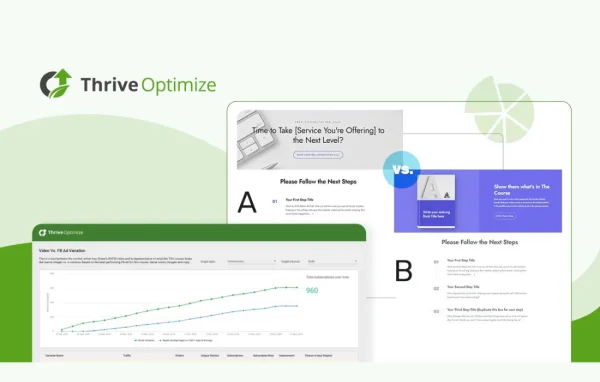
Thrive Optimize by Thrive Themes is a WordPress plugin for A/B testing landing pages. It works inside Thrive Architect, so you can create page variations, split your traffic between them and see which version turns more visitors into subscribers or customers.
Install this firstPlease install the Thrive Product Manager Plugin from here to Activate Thrive Products
Go to product- Version
- 11.1
- Released
- Oct 8, 2026
- Developer
- Thrive Themes
- Type
- WordPress plugin
- Licence
- GPL
- Included in
- Every plan, or $2.39 a year on its own
What’s new in Thrive Optimize 11.1
Version 11.1 · Oct 8, 2026
Latest
What it does
Choosing between two landing page designs often comes down to guesswork. Thrive Optimize replaces that guess with a split test. You build alternate versions of a page, the plugin shows them to different visitors, and you compare how each one performs. It is aimed at bloggers, marketers and small business owners who want to test ideas without writing code or setting up a separate testing platform.
The plugin is built for people who already design pages with Thrive Architect. You clone a page inside the editor, change the headline, layout or offer, and start a test. Conversion rates and visitor behavior appear in your WordPress dashboard while the test runs. You can run several tests, follow their progress and pause or stop each one when a clear winner emerges. It is meant to work alongside your existing theme and plugins.
Best for
- Thrive Architect users building landing pages
- Bloggers testing email signup pages
- Small businesses comparing sales page versions
Features
Built into Thrive Architect
Create, clone and test multiple landing page variations directly inside the Thrive Architect editor, so building and testing happen in the same place.
No code required
Launch split tests through simple controls in WordPress, with no coding or technical configuration needed to get a test running.
Results in your dashboard
Watch conversion rates and visitor behavior for each variation from your WordPress dashboard as data comes in during the test.
Multiple test management
Set up several tests at once, track how each is progressing and pause or stop a test once you have a winner.
Conversion comparison
See which landing page variation turns more visitors into subscribers or customers, so you can keep the version that performs better.
Works with your theme
Runs alongside your existing WordPress theme and plugins, so you can add testing without changing the rest of your site setup.
Thrive Optimize older versions
- 11.0.1Sep 23
- 11.0.0.1Sep 16
- 11.0Sep 9
- 10.9.3.3Aug 25
- 10.9.3.2Jul 22
- 10.9.3.1Jul 18
- 10.9.2.1Jun 26
- 10.9.4Jun 2
- 10.9.3May 27
- 10.9.2May 24
Members and buyers of this product can download older versions.
65 older versions in all. If you need one that is not listed, ask support.
Questions about Thrive Optimize
Do I need Thrive Architect to use Thrive Optimize?
Yes, it is designed for Thrive Architect users. Variations are created and cloned inside the Thrive Architect editor, and tests are run on those pages, so you will want Thrive Architect on your site to get the most from it.
Can I run A/B tests without any coding knowledge?
Yes. Tests are set up through a simple interface in WordPress. You clone a page, edit the variation in the visual editor and start the test, all without touching code.
Where can I see how my tests are performing?
Results show up in your WordPress dashboard. You can follow conversion rates and visitor behavior for each variation while the test runs, then pause or stop it once one version clearly performs better.
Will it work with my current WordPress theme?
It is built to work alongside any WordPress theme and your other plugins, so you can add split testing to your landing pages without switching themes.
Is Thrive Optimize free?
The code of Thrive Optimize is licensed under the GPL, so anyone may use, change and share it. GPL Feast is a paid service: a plan or a single purchase gives you the download and automatic updates. The developer's own support, licence key and online services are not included.
Which version of Thrive Optimize is this?
Version 11.1, released Oct 8, 2026. New versions appear here when the developer publishes them, and members get them as automatic updates.
How do I update Thrive Optimize?
Install the free GPL Feast Updater on your site and connect it with your API key. It installs new versions of Thrive Optimize automatically and keeps a backup, so you can roll back.
More from Thrive Themes