Plugin
Updated
Thrive Quiz Builder
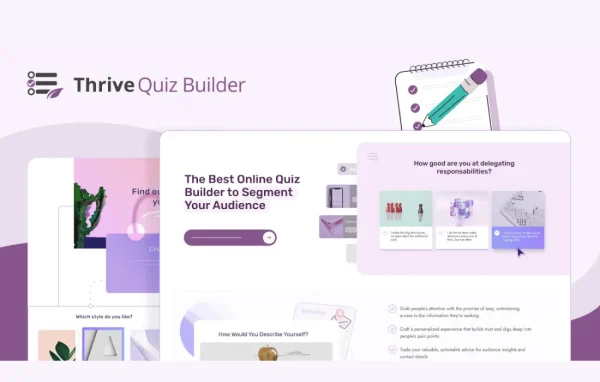
Thrive Quiz Builder by Thrive Themes is a WordPress plugin for creating interactive quizzes without writing code. You build quizzes with a drag-and-drop editor, show personalized results based on answers, and use the responses to segment your audience and grow your email list.
Install this firstPlease install the Thrive Product Manager Plugin from here to Activate Thrive Products
Go to product- Version
- 11.1
- Released
- Oct 8, 2026
- Developer
- Thrive Themes
- Type
- WordPress plugin
- Licence
- GPL
- Included in
- Every plan, or $6.39 a year on its own
What’s new in Thrive Quiz Builder 11.1
Version 11.1 · Oct 8, 2026
Latest
What it does
Many sites want to learn more about their visitors but have no simple way to ask. A quiz gives people a reason to answer questions, and those answers tell you about their preferences, behaviors and pain points. This plugin turns that idea into a working tool. You can segment visitors by their responses, send them to your email marketing service, and follow up with messages or product suggestions that match what they told you.
Quizzes are built in a drag-and-drop editor and can start from templates aimed at list building, social shares and customer insights. Results adapt to each person's answers, and visitors can share their outcomes on social media. An analytics dashboard tracks how each quiz performs. The plugin suits marketers, online businesses and course creators, who can use quizzes to test student knowledge and spot learning gaps. Quizzes are built with data privacy and GDPR requirements in mind.
Best for
- Marketers building email lists through interactive content
- Online course creators testing student knowledge
- Online stores offering quiz-based product recommendations
Features
Drag-and-drop quiz editor
Create quizzes and adjust their design to match your brand without writing any code, using a visual drag-and-drop builder.
Ready-made quiz templates
Start from templates designed for list building, social shares or customer insights, then customize the questions and layout to fit your goals.
Answer-based segmentation
Sort quiz takers into groups based on how they answer, so you can send each segment of your email list more relevant messages.
Email provider connections
Connect quizzes to popular email marketing services so new leads are added automatically and follow-up sequences can begin right away.
Personalized results
Show customized questions and outcomes depending on each visitor's responses, including tailored product recommendations drawn from their answers.
Social sharing of results
Let quiz takers share their results on social networks, giving your quizzes a way to reach new people beyond your existing visitors.
Analytics dashboard
Monitor quiz performance in real time from a dashboard, so you can see how each quiz is doing and adjust it as needed.
Privacy and GDPR focus
Build quizzes designed to respect user data privacy and help you meet GDPR requirements when collecting visitor information.
Thrive Quiz Builder older versions
- 11.0.1Sep 23
- 11.0.0.1Sep 16
- 11.0Sep 9
- 10.9.3.3Aug 25
- 10.9.3.2Jul 22
- 10.9.3.1Jul 18
- 10.9.2.1Jun 26
- 10.9.4Jun 2
- 10.9.3May 27
- 10.9.2May 24
Members and buyers of this product can download older versions.
70 older versions in all. If you need one that is not listed, ask support.
Questions about Thrive Quiz Builder
Do I need coding skills to build a quiz?
No. Quizzes are created in a drag-and-drop editor, and you can begin with a template made for list building, social shares or customer insights. You can then customize the questions, results and styling to match your brand without touching code.
Can quiz answers be sent to my email marketing tool?
Yes. The plugin connects to popular email marketing services and can segment your list based on how people answer. That lets you send follow-ups that match each group's interests instead of one generic message to everyone.
Can I use it for online courses?
Yes. Course creators can use quizzes to test student knowledge and identify learning gaps. The personalized results and analytics dashboard help you see where students are doing well and where your material might need more attention.
Does it help with data privacy rules?
The plugin is built with privacy in mind and is described as GDPR ready, so quizzes are designed to respect user data. You should still review your own privacy policy and consent settings for your site.
Is Thrive Quiz Builder free?
The code of Thrive Quiz Builder is licensed under the GPL, so anyone may use, change and share it. GPL Feast is a paid service: a plan or a single purchase gives you the download and automatic updates. The developer's own support, licence key and online services are not included.
Which version of Thrive Quiz Builder is this?
Version 11.1, released Oct 8, 2026. New versions appear here when the developer publishes them, and members get them as automatic updates.
How do I update Thrive Quiz Builder?
Install the free GPL Feast Updater on your site and connect it with your API key. It installs new versions of Thrive Quiz Builder automatically and keeps a backup, so you can roll back.
More from Thrive Themes