Plugin
Updated
EventON QR Code
EventON QR Code is a WordPress add-on by Ashan Jay for sites running the EventON calendar plugin. It places a unique QR code on each ticket or RSVP confirmation so staff can scan attendees at the door and check them in from a phone, a handheld scanner gun or a web-based scanner.
No further updatesEventon Addons are no longer updated. You will only get the version that is listed below.
- Version
- 2.1
- Released
- May 8, 2025
- Developer
- EventON
- Type
- WordPress plugin
- Licence
- GPL
- Included in
- Every plan, or $3.19 a year on its own
What’s new in EventON QR Code 2.1
Version 2.1 · May 8, 2025
Latest
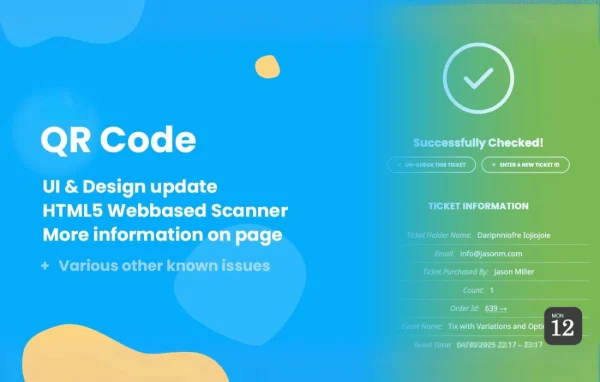
- NewIcons to checkin page buttons
- NewUn-check options
- NewTicket holder names to checkin page details
- NewSupport for RSVP waitlist attendee status
- NewRSVP custom fields to ticket information
- NewDirect settings access submenu
- NewHTML5 based web QR Scanner - beta
- FixedStyles not printing on to the page
What it does
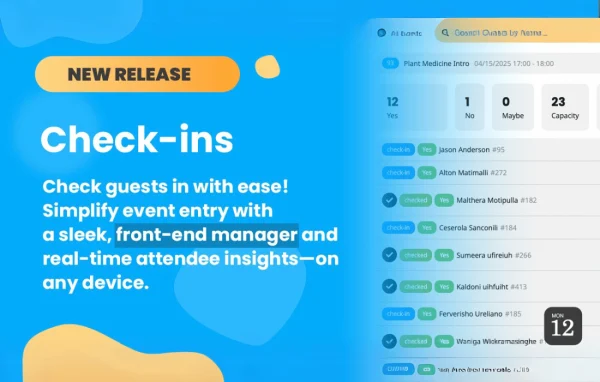
Checking guests against a printed list or a spreadsheet gets slow once a line forms at the entrance. This add-on gives each attendee a QR code inside their ticket or RSVP confirmation, created automatically when they book or respond. At the event, staff scan that code and the check-in page shows who the person is, what ticket type they hold, how many tickets are on the order and any seat or booking options attached to it.
The add-on is built to work with the EventON Tickets and RSVP add-ons, and it handles encrypted ticket numbers from the Tickets add-on. You can turn any page into a check-in station with a shortcode and adjust its appearance. Scanning can be limited to chosen admin or staff roles, and color-coded indicators help staff tell checked-in guests and ticket categories apart. Guests can be un-checked if a scan was made by mistake, and RSVP waitlist status and RSVP custom fields appear in the ticket details.
Best for
- Sites using EventON Tickets or RSVP add-ons
- Conference and concert organizers checking guests at the door
- Community groups running ticketed or RSVP events
Features
QR codes in tickets and RSVPs
A QR code is generated automatically and embedded in each confirmation ticket or RSVP, giving every attendee a scannable pass for event entry.
Several ways to scan
Staff can scan with a mobile phone camera, a handheld scanner gun or an HTML5 web-based QR scanner that runs in the browser.
Detailed ticket information
Each scan displays the ticket holder name, event type, ticket quantity and seat or booking options, along with RSVP custom fields and waitlist status.
Check in a whole order
All tickets from the same order can be checked in together, so a group arriving at once does not need each ticket scanned separately.
Role-based scanning access
Scanning permissions can be limited to selected admin or staff roles, keeping the check-in tools away from users who should not have them.
Color-coded status indicators
Visual color cues show ticket status and type at a glance, helping door staff spot guests who are already checked in.
Shortcode check-in pages
Any page can become a check-in station by adding a shortcode, with appearance settings you can adjust to match your site's look.
Flexible QR image storage
QR code images are stored separately by default, with an option to show them in the WordPress media library if you prefer.
EventON QR Code older versions
- 2.0.4Oct 7, 20243 fixes
- 2.0.3Jun 12, 20241 improvement, 1 fix
- 2.0.2Apr 12, 20241 fix
- 2.0.1Jan 24, 2024
- 2.0Apr 18, 2023
Members and buyers of this product can download older versions.
Questions about EventON QR Code
Do I need the EventON calendar plugin to use this?
Yes. This is an add-on for the EventON calendar plugin, and it is designed to work alongside the EventON Tickets and RSVP add-ons, which supply the tickets and RSVP confirmations that carry the QR codes.
Can my staff scan tickets without buying special hardware?
Yes. Staff can use the camera on a mobile phone or the HTML5 web-based QR scanner in a browser. If you already have a handheld scanner gun, that works too, and the check-in interface is designed for mobile screens.
What happens if someone is checked in by mistake?
The check-in page includes un-check options, so staff can reverse a check-in. Color-coded status indicators also make it easy to see who is already checked in before scanning again.
Can I stop regular users from accessing the check-in page?
Yes. Scanning permissions can be restricted to selected admin or staff roles, so only the people you choose can verify tickets and check attendees in.
Is EventON QR Code free?
The code of EventON QR Code is licensed under the GPL, so anyone may use, change and share it. GPL Feast is a paid service: a plan or a single purchase gives you the download. The developer's own support, licence key and online services are not included.
Which version of EventON QR Code is this?
Version 2.1, released May 8, 2025.
More from EventON