Plugin
Updated
EventON
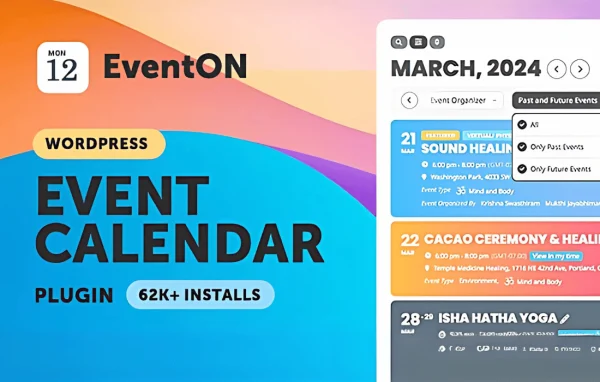
EventON by AshanJay is a WordPress plugin for creating and displaying event calendars. You add events with dates, times, locations and images, then show them in a clean, responsive calendar that visitors can browse, search and filter.
- Version
- 5.1.1
- Released
- Oct 7, 2026
- Developer
- EventON
- Type
- WordPress plugin
- Licence
- GPL
- Included in
- Every plan, or $3.99 a year on its own
What’s new in EventON 5.1.1
Version 5.1.1 · Oct 7, 2026
Latest
- NewThirdparty YoastSEO repeat site map inclusion option
- FixedLocation selecting not working
- FixedMultiple terms not showing in list
- FixedMinor UI issues
- FixedTime picker not showing in viewport for classic editor
- FixedSettings thirdparty button styles
- FixedMissing translations
- FixedSort menu showing over search field
What it does
Keeping an events page current by hand gets messy fast, especially when sessions repeat or details change. This plugin gives you a dedicated place to enter each event with its description, image, date, time and location. Recurring events can be set up once instead of copied over and over, and colors and icons help visitors tell different event types apart at a glance. The result is an organized calendar that works on desktop and mobile screens.
You choose how events appear: a monthly grid, a list or a single event view, depending on your layout. Shortcodes let you place calendars and events on any page without writing code. Visitors can search and filter by category, date or keyword, and Google Maps shows where each event takes place. Multilingual and right-to-left support helps on sites that serve other languages, and a WooCommerce connection lets you sell event tickets on your own site.
Best for
- Organizers running conferences, workshops or meetups
- Venues and communities publishing regular recurring events
- Multilingual sites that need an event calendar
Features
Multiple calendar views
Display events as a monthly grid, a list or a single event view, so the calendar suits the page layout and how your visitors like to browse.
Recurring events
Set up events that repeat on a schedule, which saves you from duplicating entries by hand and keeps dates accurate.
Search and filters
Visitors can find events by category, date or keyword, which helps on busy calendars with many upcoming listings.
Google Maps locations
Show each event's venue on an interactive Google Map so attendees can see where to go and plan their route.
Custom colors and icons
Assign colors and icons to events so different event types stand out from one another when someone scans the calendar.
Shortcode placement
Embed calendars and individual events anywhere on your site using shortcode options, with no coding knowledge needed.
Multilingual and RTL support
Run the calendar in multiple languages and in right-to-left text formats for audiences who read Arabic, Hebrew and similar scripts.
WooCommerce ticket sales
Connect with WooCommerce to sell event tickets directly from your site, keeping registration and payment in one place.
EventON older versions
- 5.1Oct 225 new, 6 improvements, 11 fixes
- 5.0.13Aug 74 new, 3 improvements, 8 fixes
- 5.0.12Jul 32 fixes
- 5.0.11Jun 24
- 5.0.10May 22
- 5.0.9Apr 8
- 5.0.8Feb 28
- 5.0.7Feb 24
- 5.0.6Dec 23, 2025
- 5.0.5Dec 16, 2025
Members and buyers of this product can download older versions.
60 older versions in all. If you need one that is not listed, ask support.
Questions about EventON
Can visitors see events in different layouts?
Yes. EventON offers a monthly grid, a list view and a single event view. You can pick the one that fits your page, and shortcodes let you place calendars in different spots across your site.
Can I sell tickets for my events?
Yes, through WooCommerce. The plugin connects with WooCommerce so you can sell event tickets directly from your own site, which keeps the registration process in one place for attendees.
Does it handle events that repeat every week or month?
It supports recurring events, so you can set an event to repeat instead of creating a separate entry for each date. This saves time and keeps your schedule accurate.
Will it work on a site in another language?
The plugin includes multilingual support and right-to-left text compatibility, so it can be used on sites in other languages, including those written in right-to-left scripts.
Is EventON free?
The code of EventON is licensed under the GPL, so anyone may use, change and share it. GPL Feast is a paid service: a plan or a single purchase gives you the download and automatic updates. The developer's own support, licence key and online services are not included.
Which version of EventON is this?
Version 5.1.1, released Oct 7, 2026. New versions appear here when the developer publishes them, and members get them as automatic updates.
How do I update EventON?
Install the free GPL Feast Updater on your site and connect it with your API key. It installs new versions of EventON automatically and keeps a backup, so you can roll back.
More from EventON